
printQ – From Labels to 3D Packaging: web to print b2b

printQ combines a modern web to print b2b platform with a 2D/3D design environment that covers labels, stickers and packaging. The Magento-based solution offers a B2C shop and B2B portals in one system, supports a WYSIWYG editor, template gallery, Variable Data Printing and mobile uploads. Open APIs, dynamic preflight checks and automated workflows ensure efficiency from design to production. For print houses, agencies and enterprises, this translates into fewer errors, faster time to market and scalable web to print b2b storefronts.
The new era of labels, stickers and 3D packaging
Personalised labels, eye-catching stickers and tailor-made packaging shape the first impression of a product. While consumers share unboxing videos on social media, print providers face the challenge of delivering these products quickly, flawlessly and in high quality. In this complex world, printQ comes into play: a web to print b2b solution that combines creative freedom, industrial precision and automation. Based on Adobe Magento (Adobe Commerce), the solution revolutionises the production of labels and 3D packaging by allowing customers to design products in the browser and see them immediately in a realistic preview.
From labels to 3D packaging – why web-to-print needs a fresh approach
Demand for customised packaging is growing: customers expect personalised boxes with names or messages and order conveniently via their browser. Modern web to pack platforms enable this trend by linking online ordering, 3D visualisation, preflight checks and production. Best-practice guides recommend that such solutions support both B2C storefronts and B2B portals, offer an intelligent 3D design studio, integrate 3D previews and price calculators, and provide automation and open integrations. Studies on 3D packaging software show that automatic dieline generation reduces the number of pre-press corrections and can save up to 30 % of prepress costs. A web to print b2b platform must therefore not only offer creative freedom, but also minimise sources of error and streamline the entire workflow.
printQ: Premium web-to-print on Magento
printQ is the only web-to-print solution natively based on the Adobe Magento platform. This provides complete e-commerce functionality: customer accounts, multi-currency handling, discount rules, tax calculation and reporting work seamlessly with the web-to-print editor. The platform can be operated as SaaS in the cloud or on-premise, and its headless architecture is API-first – meaning it avoids vendor lock-in and can be flexibly integrated into existing systems.
B2C shop and B2B portals in one system
A key feature of printQ is its ability to run both open B2C shops and closed B2B portals. Modern solutions are expected to support both shop types because B2C shops enable quick orders, while B2B portals offer access restrictions, approvals and budget control. printQ fulfils this requirement with multi-storefront capabilities, allowing print providers to manage multiple brands or branches via a single backend while delivering individual corporate identities and domains for each organisation.
Roles, approvals and CI templates
To ensure that companies comply with their corporate design guidelines, printQ offers differentiated roles and approval processes. Administrators define CI templates that lock colours, fonts and positions, while individual users may only edit variable fields. The workflow engine enables budget approvals and hierarchical sign-offs – ideal for franchise systems and global brands.
Online editor: WYSIWYG with 2D/3D preview
The beating heart of printQ is the browser-based WYSIWYG editor that places text, logos and graphics exactly where they will appear. What you see is the finished product: customers see changes immediately and adjust layouts in real time.
2D, 3D and live preview
printQ provides the right preview for every product type. 2D views help check crop and fold lines, 3D previews allow boxes or labels to be rotated and zoomed, and live previews show the product in context. Users can switch between modes at any time, and all changes become visible instantly.
Intuitive operation and responsiveness
Thanks to modern web technologies, the editor works on desktop, tablet and smartphone. The extremely responsive interface ensures that customers can start without installing software and that print providers do not have to maintain a separate app.
Template gallery and Variable Data Printing – limitless personalisation
Not every user is a designer. That is why printQ provides an extensive template library with millions of professional designs for various industries. Users select a layout, adjust colours, text and logos, and benefit from dynamic layouts that automatically recalculate when the format changes and still remain harmonious.
Liquid layouts and one design for many formats
The liquid layout engine automatically adapts templates to different sizes. If a poster is reduced to a flyer format, the algorithm rearranges all elements according to design rules such as the golden ratio. This saves time and prevents design errors.
Variable Data Printing (VDP)
For series products such as business cards or mailings, printQ supports Variable Data Printing. Thanks to PDF/VT integration, all elements can be personalised and dynamically populated with data from Excel or CSV files. Intelligent validated form fields ensure that mandatory fields are correctly filled in, and errors are displayed immediately. In this way, hundreds of individualised labels or packaging can be produced in a single run without violating corporate identity.

Vectorisation and finishing: more shine for your products
printQ can automatically convert raster graphics into vector data and thus provides the basis for high-quality finishing. Customers choose how much smoothing is applied and create fine lines for hot foil stamping or spot varnish. The finishing function allows gold or silver foils, relief varnishes and other finishes to be applied to text or graphics with a few clicks. These functions are not merely cosmetic – they also ensure that print data meets professional standards.
Mobile upload and InDesign workflow: flexibility for data import
With mobile upload, images can be inserted into the design via smartphone or tablet. Users scan a QR code on the desktop to link their mobile device. They then select photos and drag them into the online editor via drag-and-drop.
Professional designers often work with Adobe InDesign. printQ therefore supports an InDesign workflow: templates are created in InDesign with three layers (background, editable elements, foreground) and then imported into printQ. This makes it possible to create CI-compliant templates that can be edited in closed B2B portals without changing the underlying layout.
Automation, preflight and workflow
Once a customer submits the design, printQ handles the rest. An integrated preflight check examines resolution, colour space, font embedding, minimum font sizes and layer structures before the order is placed. Tools such as callas pdfToolbox and Enfocus PitStop are integrated so that professional standards are automatically met.
Product configuration and price calculation
When configuring a product, the customer selects materials, formats, finishes and quantity. printQ checks the combinations for plausibility and displays only suitable options. At the same time, dynamic calculation determines realistic prepress, printing and finishing costs based on industry constants. This transparency builds trust and reduces queries.
JDF/XML-based production workflow
After approval, printQ automatically creates press-ready PDF files including cutting and folding lines and transfers them along with a JDF or XML job ticket into the production workflow. Thanks to hotfolder integration, the order can be sent directly to RIP servers or cutting tables. Automated transmission of cutting dies and job pockets minimises sources of error and increases throughput speed.
Open API and integrations
A modern web to print b2b system must be open so that it can be seamlessly integrated into existing e-commerce and production environments. printQ uses a headless approach with documented REST and SOAP APIs. With the shop connector, common systems such as Magento, BigCommerce, Shopware or Shopify can be connected at the click of a mouse, while data exchange via XML, JDF, CSV or JSON enables integration into MIS/ERP solutions. This API-first philosophy prevents vendor lock-in and allows printQ to be used as a backend while individual frontends or marketing automation tools are connected.
Scalability and multi-client management
Whether a small print service provider or an international corporation – printQ scales. The system supports multi-tenant operation with multiple domains, languages, currencies and price lists in one installation. A modern web-to-print platform must offer multi-client capability so that print providers can operate hundreds of portals for different brands or regions without increasing technical overhead. printQ meets this requirement and operates over 1,000 active portals worldwide.
Target groups and benefits
For printing houses and print service providers
Print providers benefit from automated workflows and fewer sources of error. Preflight checks, plausible product configuration and automated handover to production reduce corrections and waste. Dynamic price calculation and integrated shop functions create new revenue opportunities. Multi-shop capability allows repeat orders for various customers to be processed efficiently while increasing the volume of orders.
For agencies and white-label providers
Agencies appreciate printQ’s white-label capability. They can manage multiple customer shops, represent each brand in compliance with corporate identity and manage templates. The InDesign workflow facilitates collaboration with professional designers, while the roles and approval system ensures that only authorised users make changes.
For companies, franchise and corporate structures
Closed B2B portals provide companies with central control over brand assets, budgets and approvals. Local branches can customise predefined templates without violating corporate identity guidelines. Thanks to the multi-tenant architecture, global franchise structures can be mapped, and integration into ERP, CRM and finance systems ensures seamless reporting.
Case studies from practice
Many successful print providers already use printQ. For example, SAXOPRINT uses printQ to serve both B2C customers and corporate clients with individual portals. The launch of several closed shops for franchise chains enables repeat orders to be processed automatically. Druckhäusle, a specialised manufacturer, automated its preflight checks with printQ and significantly reduced turnaround times. Velocity Graphics relied on the modular structure to gradually transform from a traditional print business into a fully automated web-to-print provider and expand its production capacity.
Intelligent packaging and artificial intelligence
CloudLab is continuously developing the 3D packaging functions. Plans include AI-based dieline recognition that automatically identifies cutting and folding lines and advanced material simulation that more realistically depicts light reflections, transparency and texture. In addition, the developers are working on sustainability optimisations that suggest environmentally friendly materials, and on integrating augmented reality so that customers can virtually test packaging in real environments. With these innovations, printQ becomes not only a production platform but a central tool for smart packaging.
The demands on labels, stickers and 3D packaging are growing rapidly – and with them the complexity for print providers, agencies and brands. printQ shows that a modern web to print b2b solution can meet these challenges: From the 2D/3D design environment through the template gallery and Variable Data Printing to the automated preflight check and API-driven workflows, printQ covers the entire process. Deep Magento integration, multi-tenant capability and open APIs offer scalability and prevent dependencies. Whether you are designing personalised labels or developing complex 3D packaging – with printQ you can realise creative ideas efficiently, reduce errors and unlock new business opportunities.
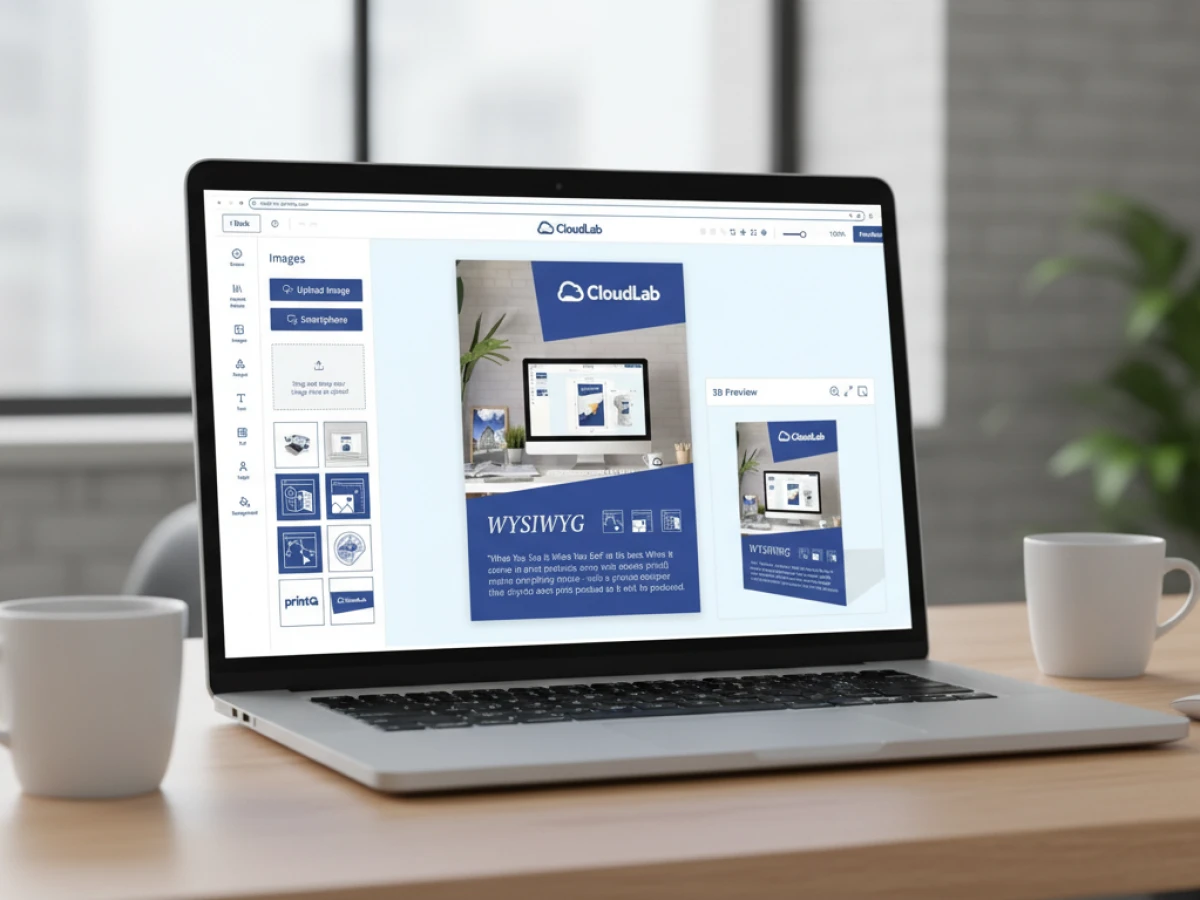
An overview of all features of printQ developed by CloudLab
- WYSIWYG Designer – An intuitive online editor that lets users arrange text, logos, and graphics with real-time 2D/3D previews on any device.
- Print Previews – Instant 2D, 3D, and live views to verify designs before printing.
- Vectorization & Embellishment – Converts raster graphics to smooth vectors and adds special finishes like foil stamping, embossing, or letterpress.
- Template Gallery – Offers millions of editable templates and automatically adapts a design to multiple formats.
- Variable Data Printing (VDP) – Personalises products using PDF/VT with dynamic fields for text, images, or barcodes and supports data uploads.
- Mobile Upload – Allows photos to be added via QR code from smartphones directly into the design tool.
- Commercial Print – Enables the design of business stationery (business cards, letterheads, invoices) that follow corporate branding.
- Wide Format Printing – Lets users create large-format products like banners and posters while selecting sizes and materials.
- Labels & Stickers – Designs custom-shaped labels or stickers with material options and provides live browser or PDF previews.
- Editorial Designer – Facilitates multi-page layouts for brochures, allowing flexible page counts and spreads.
- Promotional Item Designer – Creates branded merchandise such as pens and apparel with accurate product previews.
- Textile Printing Designer – Designs T‑shirts, hoodies, or polos with full control over colours and placement and includes vector conversion.
- eCommerce Integrations & API – A headless system with REST/SOAP and file-based APIs plus connectors for platforms like Magento, Shopify and Shopware.
- Product Configuration & Pricing – Configures paper types, colours and finishes while ensuring valid combinations and calculating realistic prices.
- InDesign Workflow – Imports multi-layer InDesign templates so content can be edited online while preserving fixed design elements.
- Production Workflow – Generates print-ready files and JDF/XML job tickets to automate production through hotfolder integration.
- Dynamic Preflight Check – Works with preflight software to verify fonts, resolution and colour spaces during upload.





